

Sagar Club Forgot Password
Reset with your phone number
Locked out? You can reset your Sagar Club password yourself with your registered number and an SMS code.
Forgetting a password is the single most common Sagar Club login problem. The good news: the reset is self-service and takes about two minutes, as long as you still have the phone number you registered with.
If you remember your current password and just want a new one, use change password instead.
Contents
Reset your Sagar Club password
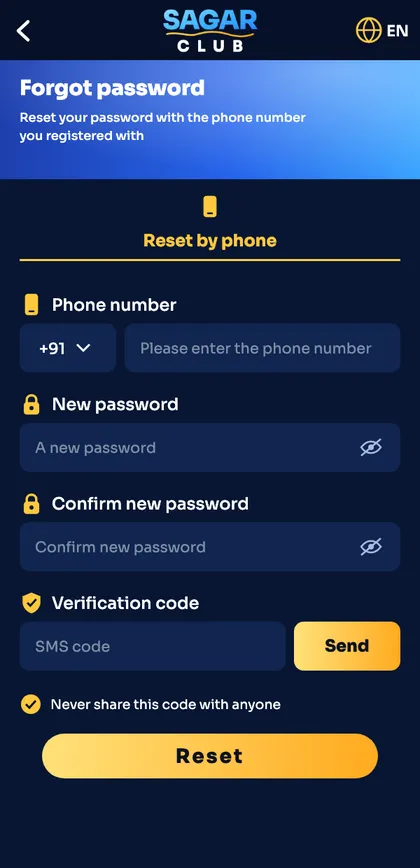
- On the login screen tap Forgot password.
- Enter your registered 10-digit number.
- Type a new password and confirm it.
- Tap Send to get the SMS code and type it in.
- Tap Reset, then log in with the new password.
Choosing a new password
- At least 8 characters.
- Mix letters and numbers; add a symbol if allowed.
- Not your name, phone number or date of birth.
- Different from your email and UPI passwords.
When the reset doesn’t work
No SMS code
Follow the OTP not received checklist.
“Number not registered”
You registered with another number. Try your other SIMs.
You no longer have the number
Contact customer care – they will verify you another way.
Code says expired
Request a new one and use it within the time shown.
How long a reset takes
| Requesting the SMS code | Under a minute |
| Code validity | A few minutes |
| Whole reset | About 2 minutes |
| If you’ve lost the number | Depends on support verification |
Reset on the website or the app?
Both work the same way. If the app is acting up, try the website in Chrome or Safari – the reset screen there is identical, and your new password works everywhere straight away.
After resetting
- Log in once on every device you use.
- Update the password in your password manager.
- If you reset because you suspected someone else had access, read account security.
- Turn on login alerts.
Can’t remember any password and can’t get the SMS? Customer care can verify you with your UID and other details.
Ready to open Sagar Club?
Use the official app or website. One Sagar Club account works for login on every device.
Frequently asked questions
Can support tell me my password?
No. Passwords are never shown – you can only set a new one.
How many times can I request a code?
A few times; after that wait about 30 minutes.