

Sagar Club Register
New account in about a minute
Create your Sagar Club account with an Indian mobile number, a password and a one-time SMS code. Here’s every field, explained.
Sagar Club register takes about a minute when you know what each box wants. Most failed sign-ups come from three things: a mistyped number, passwords that don’t match, and an OTP that arrives after the timer runs out. This guide fixes all three before they happen.
You need to be 18 or older, and you need a phone that can receive SMS on the number you register with.
Contents
- Before you register
- Sagar Club register: step by step
- Every register field explained
- Verifying your number (OTP)
- Mistakes that block a new Sagar Club account
- What to do right after you register
- Choosing the right number
- Password rules for Sagar Club register
- After the SMS code
- Register on Sagar Club from a laptop
- FAQs
Before you register
| You need | An Indian mobile number that receives SMS |
| Password | At least 8 characters – letters plus numbers is best |
| Invite code | Optional – filled in automatically if a friend shared a link |
| Time | About 1 minute |
| Age | 18+ only – you confirm this with a tick box |
| Cost | Registering is free |
Sagar Club register: step by step
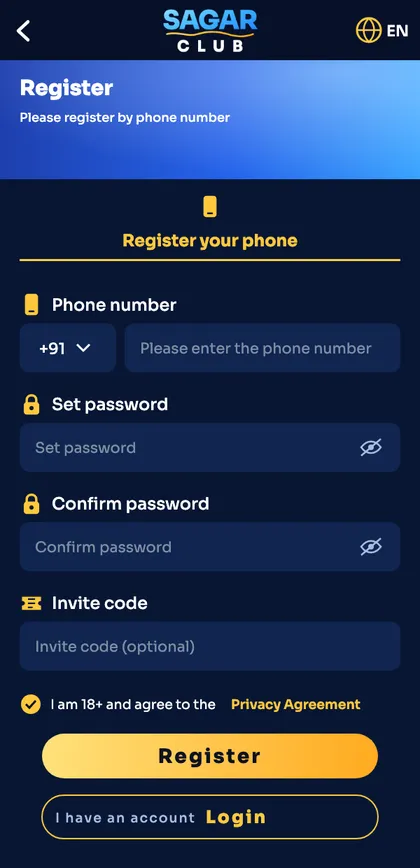
- Open the Sagar Club app or the official website and tap Register.
- Keep +91 and type your 10-digit mobile number.
- Set a password, then type it again in Confirm password. Both must match exactly.
- Leave the invite code as it is, or paste a friend’s code. It can be left blank.
- Tick the box confirming you are 18+ and agree to the privacy agreement.
- Tap Register, enter the SMS code if asked, and you land in the lobby.
Every register field explained
| Field | What to enter |
|---|---|
| Phone number | Your login ID from now on. Use a number you will keep – changing it later needs support. |
| Set password | Minimum 8 characters. Avoid your name, birthday or 12345678. |
| Confirm password | Must match character for character. Auto-correct is the usual culprit. |
| Invite code | Links your account to the friend who invited you. Wrong codes don’t block sign-up – just clear the box. |
| Privacy agreement | You must tick it. Read it once; it explains what data the platform keeps. |
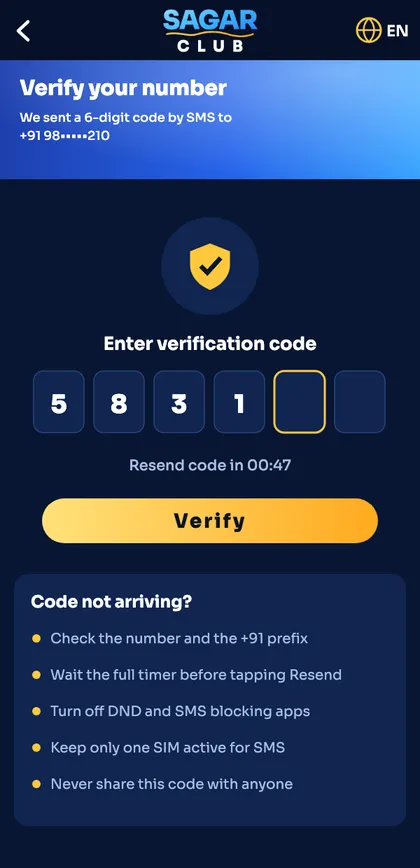
| Verification code | 6 digits by SMS, valid for a few minutes. Don’t request a new one until the timer ends. |
Verifying your number (OTP)
After you tap Register, an SMS with a 6-digit code is sent to your number. Type it into the boxes – most phones offer to paste it automatically.
- Code didn’t arrive in 60 seconds? Wait for the timer, then tap Resend once.
- DND or spam-blocker apps can hide the SMS – check your blocked messages folder.
- Dual-SIM phones: make sure SMS is set to the SIM you registered.
Still stuck? Our OTP not received page has every fix, in order.
Mistakes that block a new Sagar Club account
“Phone number already registered”
You (or someone) already made an account with this number. Use Sagar Club login or reset the password instead of registering again.
“Passwords do not match”
Retype both by hand. Copy-paste can add a trailing space.
“Invalid invite code”
Clear the invite code box completely and register without one.
Register button does nothing
You haven’t ticked the 18+ / privacy box, or one field still has red text under it.
What to do right after you register
- Set a nickname and avatar in account settings.
- Bind an email so you have a second way to log in.
- Turn on login alerts.
- Save the official link or install the Sagar Club app.
- Read the first-day checklist – ten small things that save trouble later.
Choosing the right number
The number you register with becomes your Sagar Club login ID and the place your password-reset codes go. Pick a number you’ll keep for years – not a temporary SIM or a family member’s phone. If you use two SIMs, use the one that’s always active. Changing the number later is possible, but it needs verification (change mobile number).
Password rules for Sagar Club register
| Rule | Advice |
|---|---|
| Length | 8 characters minimum; 12+ is better |
| Characters | Letters and numbers; a symbol helps |
| Avoid | Your name, number, birthday, ‘sagarclub123’ |
| Reuse | Never reuse your email or UPI password |
A simple method: three unrelated words plus a number and a symbol. Our password tips post explains it.
After the SMS code
Once the code is accepted you’ll see the lobby and a welcome banner. Your account now has a UID – a unique number shown on the Account page. Note it down; customer care uses it to find your account quickly. Then do the first three items on the first-day checklist: bind an email, turn on alerts and set a nickname.
Register on Sagar Club from a laptop
You can register in a laptop browser exactly as on a phone – the SMS code still goes to your mobile, so keep it nearby. The account works on the app afterwards with the same number and password.
Ready to open Sagar Club?
Use the official app or website. One Sagar Club account works for login on every device.
Frequently asked questions
Is Sagar Club register free?
Yes. Creating an account costs nothing.
Can I register without an invite code?
Yes. The invite code is optional – leave the box empty.
Can I register two accounts?
One account per person and per phone number. Duplicate accounts can be closed.
Why didn’t my OTP arrive?
Usually DND, a full inbox or the wrong SIM. Wait for the timer and resend once.
Do I need to register again for the app?
No. Register once – the same account logs in on the app and the website.