

Sagar Club Account Settings
Your profile, explained
Everything on the Sagar Club account page, what it does and which settings to turn on first.
The Sagar Club account page is where you set up your profile and protect your login. Five minutes here after registering saves a lot of trouble later.
Open it from the Account tab at the bottom of the app.
Contents
The account page
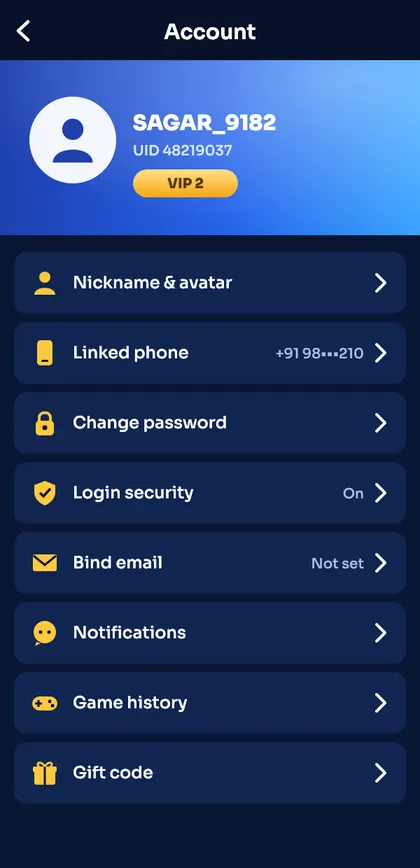
| Setting | What it does |
|---|---|
| Nickname & avatar | How other players see you |
| UID | Your unique account number – support will ask for it |
| Linked phone | Your login number – see change number |
| Change password | See change password |
| Login security | Alerts for new devices |
| Bind email | Second way to log in |
| Notifications | Gift codes, check-in reminders, alerts |
| Game history | Your past rounds – see game history |
Set these up first
- Bind an email.
- Turn on login security alerts.
- Change the default nickname to something that isn’t your real name.
- Note down your UID somewhere safe.
Privacy tips
- Don’t use your phone number as your nickname.
- Avoid photos of yourself as the avatar.
- Screenshots shared online often show your UID – crop it out.
Binding an email
- Account → Bind email.
- Type an email you check regularly.
- Enter the verification code sent to that email.
- You can now use email login.
Login security
The Login security option shows recent devices and lets you turn on alerts. If you see a device you don’t recognise, change your password straight away.
Game history
Game history lists your own rounds by game and date. It’s handy for keeping track of how much time you spend – which is a good habit (responsible play).
Ready to open Sagar Club?
Use the official app or website. One Sagar Club account works for login on every device.
Frequently asked questions
Where do I find my Sagar Club UID?
At the top of the Account page, under your nickname.
Can I change my nickname?
Yes, from Nickname & avatar.