

Sagar Club Invite Friends
Share your code or link
Every Sagar Club account has an invite code and link. Friends who register with it are linked to your account.
The Sagar Club Invite page lets you share your personal link or copy your code. When a friend registers with it, they appear in your friends list.
Only invite people who are 18+ and actually want to join – no spam.
Share your invite
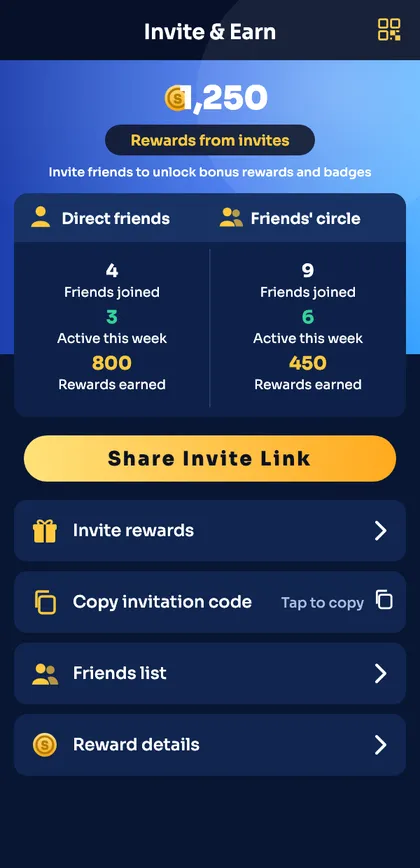
- Open the Invite tab.
- Tap Share Invite Link to send it in a chat, or Copy invitation code.
- Your friend opens the link and registers – the code fills in automatically.
- They appear in Friends list.
Invite page sections
| Direct friends | People who registered with your code |
| Friends’ circle | People your friends invited |
| Invite rewards | The current invite rules |
| Reward details | History of invite rewards |
Good manners
- Don’t post your link in random groups.
- Never offer to ‘manage’ a friend’s account.
- Point friends to the register guide so they get set up correctly.
Helping a friend register
- Send them your invite link.
- Point them to the register checklist.
- Remind them to use their own number and password.
- Never ask for their OTP – and don’t give them yours.
Each person should manage their own account. Sharing accounts or ‘managing’ a friend’s login is against the rules and risky for both of you.
Ready to open Sagar Club?
Use the official app or website. One Sagar Club account works for login on every device.
Frequently asked questions
Where is my Sagar Club invite code?
Invite tab → Copy invitation code.
Can I add a friend after they registered?
No – the code must be used during registration.