

Sagar Club Register Checklist
10 points before you tap Register
Run through this checklist and your Sagar Club register will work first time.
Most failed Sagar Club register attempts come from small things – a number typed with 0, a password with a stray space, an OTP that expired. This checklist catches them.
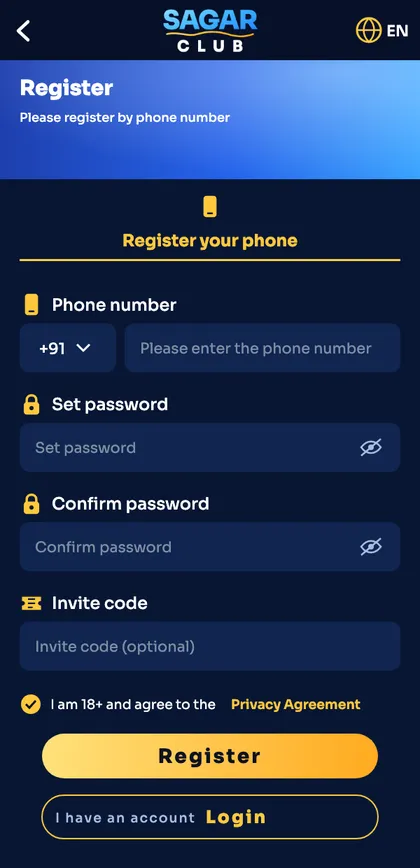
Full field-by-field guide: Sagar Club register.
Before you start
- You are 18 or older.
- Your SIM receives SMS (send yourself a test text).
- DND isn’t blocking service messages.
- You have a password ready – 8+ characters, not used elsewhere.
- You’re on the official app or website (how to check).
While filling the form
- Type exactly 10 digits.
- Type the password twice by hand – don’t paste.
- Leave the invite code alone unless a friend gave you one.
- Tick the 18+ / privacy box.
- Tap Register once and wait for the SMS.
The five mistakes
Extra 0 in the number
Leads to ‘invalid number’.
Passwords don’t match
Usually a trailing space.
Pressing Resend early
Cancels the first code.
Wrong invite code
Clear the box.
Registering twice
If the number is taken, log in instead.
After registering, set up your account with the first-day checklist.
Print-friendly version
- 18+
- SMS works
- DND off
- Password ready
- Official link
- 10 digits
- Typed twice
- Invite code optional
- Box ticked
- Tap once, wait
Ready to open Sagar Club?
Use the official app or website. One Sagar Club account works for login on every device.
Frequently asked questions
How long does Sagar Club register take?
About a minute.
Can I register with email only?
No – registration uses a mobile number; you can bind email later.