

Sagar Club Login Step by Step
Screen-by-screen walkthrough
If the Sagar Club login screen confuses you, follow this slow walkthrough. Every tap, every message.
This Sagar Club login walkthrough is for people opening the app for the first time after registering – or coming back after a long break. It goes one screen at a time.
Short on time? The quick version is on the main Sagar Club login page.
Contents
Screen 1 – the welcome screen
When you open Sagar Club you see the logo at the top and two buttons: Log in and Register. If you already registered, tap Log in. If the app opens straight into the lobby, you’re already logged in – nothing to do.
Screen 2 – choose phone or email
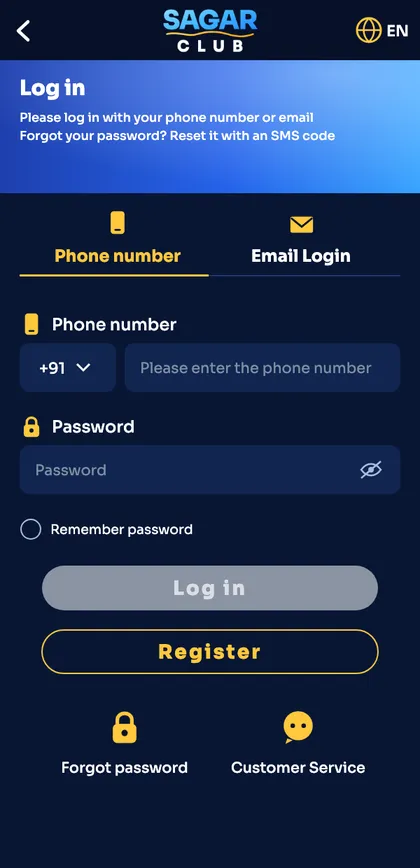
Two tabs sit at the top of the form. Phone number is selected by default and is what most people use. Email Login only works if you bound an email after registering.
Not sure if you bound an email? Use phone login – it always works.
Screen 3 – type your number
- The +91 box is already filled – don’t touch it.
- Type 10 digits. No 0, no spaces, no +91.
- If your keyboard adds a space automatically, delete it.
Screen 4 – type your password
- Tap the eye icon to show the password while you type.
- Watch for auto-capitalised first letters.
- Tick Remember password only on your own phone.
Screen 5 – tap Log in
The button turns gold when both fields are filled. Tap it once – tapping repeatedly can trigger ‘too many attempts’. In a second or two the lobby loads with your nickname and UID.
If something goes wrong
Account does not exist
Number typo or not registered – login errors.
Wrong password
Reset it after two tries.
Nothing happens
Check your connection; see OTP and login problems.
Logged in? Follow the first-day checklist next.
Quick recap
| Step | Action |
|---|---|
| 1 | Welcome → Log in |
| 2 | Phone tab |
| 3 | 10 digits |
| 4 | Password |
| 5 | Log in → lobby |
Ready to open Sagar Club?
Use the official app or website. One Sagar Club account works for login on every device.
Frequently asked questions
Do I need an OTP for every Sagar Club login?
No – only for registering and password resets.
How long does login take?
Under 30 seconds.