

Sagar Club Invite Code
The register field, explained
The invite code on the Sagar Club register screen links your new account to the friend who invited you. It’s optional.
Every Sagar Club account has its own invite code. When a friend shares their link, the code fills in automatically on the register screen. If you didn’t get one, just leave the box blank.
Want to invite people yourself? See invite friends.
Contents
Invite code basics
| Required? | No – optional |
| Where it appears | Last field on the register screen |
| Can I change it later? | No – it’s linked when the account is created |
| Your own code | Account → Invite → Copy invitation code |
Problems with invite codes
“Invalid invite code”
The code has a typo or has expired. Clear the box and register without it.
Code filled in automatically
You opened a friend’s link. Keep it or clear it – both are fine.
Forgot to enter it
It can’t be added after registration.
Where to find your own code
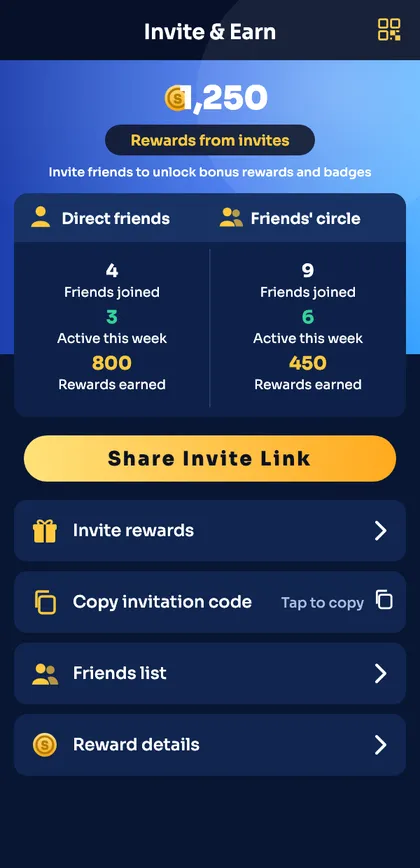
- Log in.
- Open the Invite tab.
- Tap Copy invitation code or Share Invite Link.
What the invite code changes
The invite code only links your account to the person who invited you – it appears in their friends list. It doesn’t change your login, your password or which games you can open. Registering without a code gives you exactly the same account.
Invite code vs gift code
| Invite code | Gift code | |
|---|---|---|
| Where used | Register screen | Gift page after login |
| Who has it | Every player has their own | Posted on official Telegram |
| How often | Once, at sign-up | Whenever new codes are posted |
Ready to open Sagar Club?
Use the official app or website. One Sagar Club account works for login on every device.
Frequently asked questions
Do I need an invite code for Sagar Club register?
No.
Is there a public Sagar Club invite code?
We don’t publish codes. Use a friend’s or leave it blank.